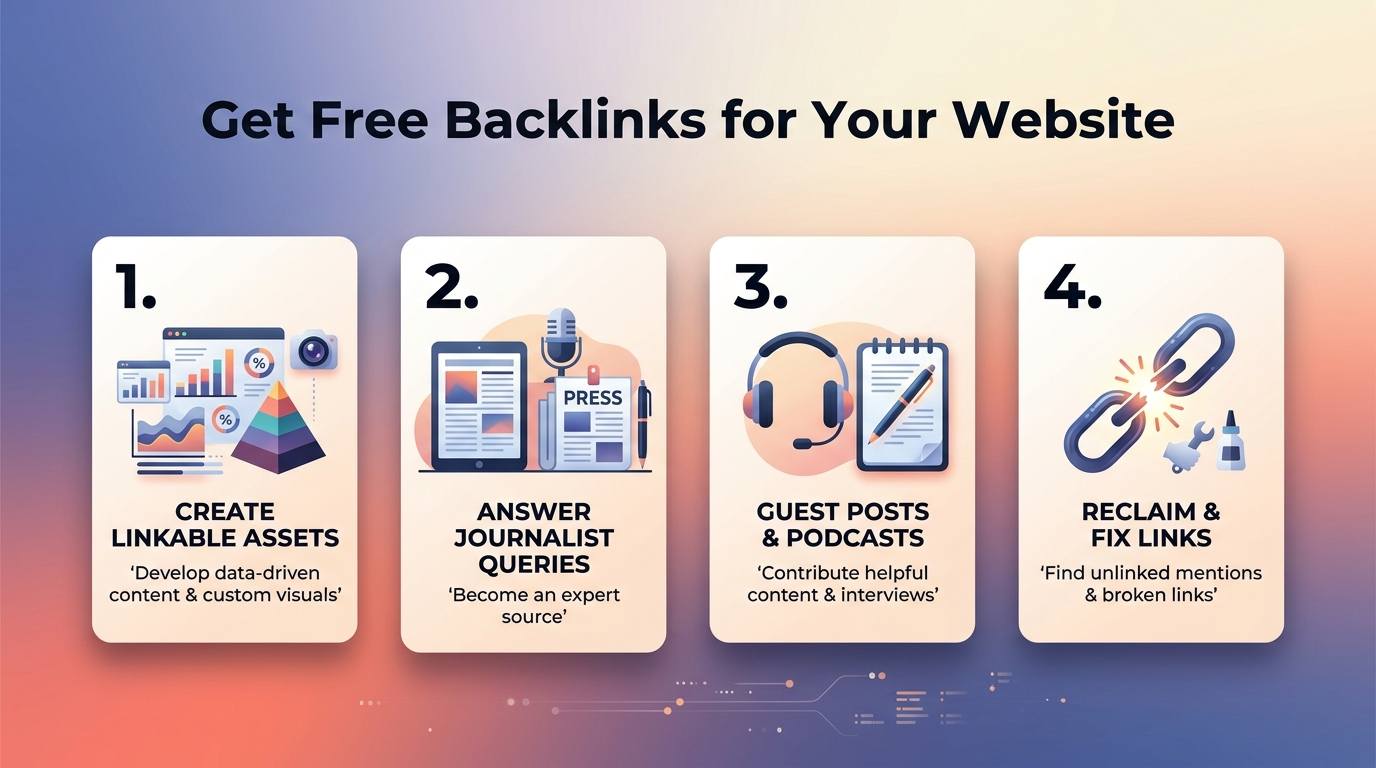


Backlinks, also known as inbound links or incoming links, are links from one website to another. When another website links to your website, it creates a backlink that can help visitors discover your content and provide search engines with additional information about your website's relevance and authority.
Backlinks are an important part of Search Engine Optimization (SEO). Search engines like Google use links to discover web pages and understand relationships between websites. However, not all backlinks have the same value. A relevant link from a trusted website can be more useful than hundreds of unrelated links from low-quality websites.
If you want to improve your website's SEO, increase referral traffic, and build an online presence, creating useful content and earning relevant backlinks should be part of your strategy.
Quality backlinks can provide several benefits:
Improve website discovery: Help search engines and visitors discover your web pages.
Increase referral traffic: Bring visitors from other websites to your content.
Build website credibility: Links from relevant and trusted sources can strengthen your online reputation.
Support SEO: Relevant backlinks can contribute to your website's search visibility.
Build business relationships: Connect with bloggers, businesses, publishers, and industry professionals.
Understanding different backlink types helps you make better SEO decisions.
A normal link without a special nofollow attribute can be considered by search engines when evaluating links. However, a link does not guarantee improved rankings.
A link containing rel="nofollow" tells search engines that the website does not want to associate itself with or endorse the linked page in the usual way.
Links placed in advertisements, sponsorships, or paid promotions should use the rel="sponsored" attribute.
Links published in user-generated content, such as forum posts and comments, can be marked with rel="ugc".
The following platforms can help you publish useful content, create business profiles, share projects, participate in communities, and build your online presence.
Important: These are backlink and content-promotion opportunities, not guaranteed dofollow backlink sources. Some platforms use nofollow or UGC links, and some require account registration or restrict external links.
YouTube – Publish videos and tutorials with links to relevant pages on your website.
Facebook – Create a business page and share useful website content.
LinkedIn – Build a professional profile, publish articles, and share business updates.
Pinterest – Share visual content, infographics, and website resources.
Instagram – Promote your brand through posts, reels, and your profile link.
X (Twitter) – Share articles, updates, and useful resources.
Reddit – Participate in relevant communities and share genuinely helpful resources.
Tumblr – Publish blog-style content and visual resources.
Flipboard – Curate and share relevant articles.
Myspace – Explore its available social networking features.
Medium – Publish original articles and share expertise in your industry.
Blogger – Create a free blog and publish useful articles.
WordPress.com – Start a blog and publish original content.
LiveJournal – Publish journal-style posts and articles.
Wix – Create a website or blog to present your work.
Weebly – Build a website and publish business information.
Google Sites – Create simple websites and resource pages.
Strikingly – Build a business website or landing page.
Yola – Create a website for your business or project.
Site123 – Build a website using its website creation tools.
Google Business Profile – Create a business profile to help customers discover your local business.
Crunchbase – Build a company profile and share business information.
Trustpilot – Collect genuine customer reviews and build business credibility.
Yelp – Create a business listing where the service supports your location and category.
Foursquare – Explore business discovery and listing services.
SlideShare – Share presentations, business documents, and educational slides.
SlideServe – Upload and share presentations.
Issuu – Publish digital magazines, brochures, and catalogs.
Speaker Deck – Share professional presentations.
Academia.edu – Share academic papers and research-related content.
Pinterest – Publish visual pins that link to useful resources.
Flickr – Share photographs and creative images.
Behance – Showcase design projects and creative portfolios.
DeviantArt – Publish artwork and creative projects.
Pixabay – Share and explore creative images.
Pexels – Share photography and visual content.
Imgflip – Create and share images and memes.
Gifyu – Upload and share images.
Vimeo – Publish professional videos and demonstrations.
Dailymotion – Share videos and other media content.
GitHub – Publish project repositories, documentation, and open-source work.
Devpost – Showcase software projects and participate in technology events.
GrowthHackers – Participate in discussions about marketing and business growth.
APSense – Explore business networking and promotional opportunities.
Quuu – Explore content discovery and sharing opportunities.
Scoop.it – Curate and share useful articles and resources.
Instapaper – Save and organize web articles for reading.
Tripoto – Publish travel-related stories and guides.
Wattpad – Publish stories and written content.
Penzu – Create and manage online journals.
AllTop – Discover articles and content from different topics.
SourceBottle – Explore opportunities to connect with journalists and sources.
Here are some practical ways to earn backlinks without purchasing them.
Contact relevant blogs and websites in your industry. Offer original articles that provide useful information to their readers.
Register your company on relevant business directories and professional networking platforms. Keep your business name, website, and contact information accurate.
Publish tutorials, research, infographics, case studies, and helpful guides that people may naturally want to reference.
Answer questions on relevant forums and communities. Share your website only when it genuinely helps answer the question.
If you develop software, create a GitHub repository with documentation, screenshots, and a link to your official website.
Connect with bloggers, publishers, developers, and businesses. Genuine professional relationships can lead to natural mentions and links.
Keep these points in mind when building backlinks:
Focus on websites relevant to your industry.
Prefer genuine editorial mentions over mass profile submissions.
Avoid automated backlink generators.
Do not purchase links intended to manipulate search rankings.
Avoid excessive link exchanges.
Do not post irrelevant links in blog comments or forums.
Use natural and descriptive anchor text.
Check whether the platform allows website links.
Focus on referral traffic and audience engagement, not only backlink numbers.
Google identifies paid ranking links, automated link creation, excessive link exchanges, and low-quality directory links as examples of link spam. Follow Google's official Spam Policies.
You can monitor your website's backlink profile using these tools:
Google Search Console – Review links Google has discovered pointing to your website.
Ahrefs Backlink Checker – Explore backlink information and referring domains.
Semrush Backlink Analytics – Analyze backlinks and referring websites.
Moz Link Explorer – Explore link metrics and backlink information.
Remember that third-party Domain Authority (DA) and Domain Rating (DR) scores are proprietary metrics. Google does not use these scores as its own ranking factors. A website with a high DA does not automatically provide a valuable backlink.
A backlink is a hyperlink from one website to another. Backlinks can help visitors discover content and provide search engines with information about relationships between pages.
Yes. Relevant, naturally earned links can help people discover your website and may support SEO. Their value depends on context, quality, and how they are placed.
They can still bring referral traffic, brand exposure, and visitors. A nofollow link should not be treated as a guaranteed ranking benefit.
There is no fixed number of backlinks required to rank. Focus on helpful content, relevant links, technical SEO, and user experience rather than backlink quantity.
Domain Authority is a third-party SEO metric developed by Moz. It is not an official Google ranking score.
Building quality backlinks is a long-term part of a successful SEO strategy. Instead of submitting your website to hundreds of platforms, choose relevant websites where you can publish useful information, showcase your work, and connect with your target audience.
Focus on creating original content, building genuine relationships, and earning relevant links naturally. These practices can help improve your website's online visibility, attract referral visitors, and support long-term SEO growth.
For more website development, digital marketing, and technology resources, explore KodeWhiz.
Welcome to our Software Solutions Company , where we excel in transforming ideas into tangible realities. We have expertise in developing online management systems, website designing & development, software solutions, mobile app development, e-commerce solutions and graphic designing. We provide 24/7 services.

ArthurJar
Nov 21, 2026
Happ представляет собой приложение, которое удобно использовать после быстрой первоначальной настройки. Перед началом работы стоит happ скачать бесплатно из надежного источника, проверить совместимость с операционной системой и убедиться, что на устройстве достаточно свободной памяти. Такой подход снижает риск установки измененного или устаревшего файла. После запуска пользователю обычно нужно выдать приложению необходимые разрешения. Их перечень лучше просмотреть внимательно: доступ следует оставлять только к тем функциям, которые действительно нужны для работы. Затем можно открыть основные параметры Happ, выбрать подходящий режим, проверить уведомления и настроить поведение приложения в фоновом режиме. Если программа используется на смартфоне, полезно оценить расход батареи и мобильного трафика. импорт ссылки хапп — https://happ-help.wiki/guides/multiple-devices
SimonWeilt
Nov 21, 2026
Happ загрузка особенно полезна, когда нужен единый инструмент для управления подключением на разных устройствах. После установки приложения стоит начать с добавления рабочего профиля и проверки соединения на мобильной сети, а затем повторить тест через Wi-Fi. Такой подход помогает понять, связана ли проблема с настройками телефона или с конкретной сетью. В поездках удобно использовать Happ на телефоне: один профиль можно оставить для домашнего интернета, а другой подготовить для публичных сетей. Если требуется установить happ на несколько устройств, лучше заранее сохранить параметры подключения и переносить их только через надежные каналы. Для Android подойдет happ скачать на андроид из проверенного источника, после чего нужно разрешить установку приложения и внимательно проверить запрашиваемые разрешения. [url=https://happ-help.wiki/help/not-connecting]happ на телевизор[/url] Полезный прием для повседневной работы — не включать соединение постоянно без необходимости. Для ресурсоемких задач, видеозвонков и доступа к отдельным [url=https://happ-help.wiki/guides]как поменять страну в happ[/url] сервисам можно выбирать нужный профиль вручную, а после [url=https://happ-help.wiki/help/not-connecting]хап не подключается[/url] завершения отключать его, чтобы снизить расход батареи. При нестабильной работе помогает смена сервера, перезапуск подключения и проверка даты и времени на устройстве. Тем, кто планирует скачать happ на все устройства, стоит использовать одинаковые понятные названия профилей. Это упростит переключение между смартфоном, планшетом и компьютером и позволит быстро определить, какая конфигурация работает лучше. ошибки хапп — https://happ-help.wiki/download
SamuelTam
Nov 21, 2026
Перед тем как скачать хапп, важно оценить не только скорость загрузки, но и условия дальнейшего использования приложения. Сначала проверьте совместимость с версией Android и объём свободной памяти. Если требуется happ скачать бесплатно, выбирайте источник, которому можно доверять: подозрительные файлы могут содержать рекламу, изменённый код или нежелательные [url=https://happ-help.wiki/help/not-connecting]не открывается хапп[/url] разрешения. После установки внимательно изучите запрашиваемый доступ. Приложению должны быть понятны разрешения, связанные с его функциями, а лишние запросы лучше отклонить. Тем, кто решил скачать приложение happ, стоит заранее проверить настройки уведомлений, расход мобильного трафика и работу в фоновом режиме. Это особенно важно, если happ на телефон скачать планируют для регулярного использования. [url=https://happ-help.wiki]что значит timeout в happ[/url] Когда требуется happ загрузка, учитывайте стабильность интернет-соединения и наличие свободного места для обновлений. Не стоит отключать автоматическое обновление без причины: новые версии исправляют ошибки и повышают совместимость. Если нужно скачать happ на все [url=https://happ-help.wiki/help/not-connecting]скачать happ на макбук[/url] устройства, установите приложение отдельно на каждом гаджете и проверьте синхронизацию настроек. Запросы «хапп скачать бесплатно» или «скачать happ для android» сами по себе не гарантируют качество результата. После установки протестируйте основные функции, обратите внимание на нагрев устройства, расход батареи и появление незнакомой рекламы. Такой подход поможет безопасно установить хапп и сохранить стабильную работу телефона. happ не добавляет конфигурацию на айфоне — https://happ-help.wiki/help/subscription-missing